In Ride A Pet, you level up pets by feeding them food from Tim's Food stand. The food to aim for is the Bone. It costs $1,500 and gives a pet +10,000 XP. The catch is that stock is limited, so you need to know when food comes back and how to grab it. This guide covers buying food, dealing with NO STOCK, and feeding your best pet without wasting clicks.
Where to buy food
Food is sold at the red-and-white striped Food stand. It's run by an NPC called Tim. Walk up to him and press E to talk.
He'll ask: "Need food to feed your pets?" Click Yup to open the food shop.
The shop has a few buttons you'll use a lot:
- A green Restock button at the top
- A ? button that shows the odds
- A red X at the top right to close the shop
- An Auto-Buy toggle on each food
The foods you can buy
These are the foods you'll see in the shop:
- Grass: Rare, $10.
- Bone: Epic, $1,500. Gives +10,000 XP to the pet you feed it to. Stock is limited (we saw x5 in stock).
- Meat: Legendary. It's listed below Bone and is often out of stock.
Bone is the one to save up for. Buy out its stock whenever you can afford it.
How to buy Bones
- Go to the red-and-white striped Food stand.
- Talk to Tim and click Yup.
- Scroll down to Bone (Epic, $1,500) and click its row to show the buy button.
- Click the green $1,500 button once for each Bone you want.
- Keep clicking until it shows NO STOCK, or until you run low on cash.
- Close the shop with the red X at the top right.
Check your cash at the bottom left before you start clicking. Five Bones cost $7,500 in total. If you can't afford one, the button goes grey and you'll see Not Enough Cash at the top.
NO STOCK, restocks and Auto-Buy
Each food only has so much stock. When it runs out, the button changes to NO STOCK and you may see Out Of Stock!
You have a few ways to deal with this:
- Wait for the timer. The shop shows New food in Xs. New food arrives about every 5 minutes.
- Use Restock. The green Restock button sits at the top of the food shop.
- Turn on Auto-Buy. Each food has its own Auto-Buy toggle. Switch it on for Bone if you want to keep buying it without clicking every time. Keep an eye on your cash while it's on.
Your pets keep earning while you wait, and they even earn while you're offline. That makes the gap between restocks a good time to save up for the next batch of Bones.
How to feed a Bone to your best pet
- Go back inside your own pen and click the red Dismount button if you're riding.
- Hold the Bone stack in your hotbar (for example, slot 3 showing x5).
- Open the pet panel on the right side. It shows your placed pets (5/5).
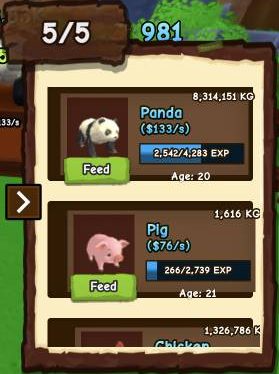
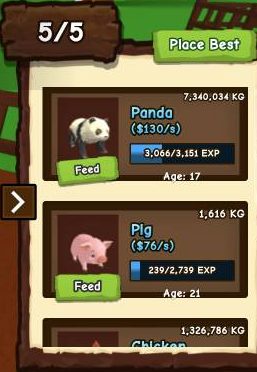
- Find your best pet, such as the Panda, and click the green Feed button under it.
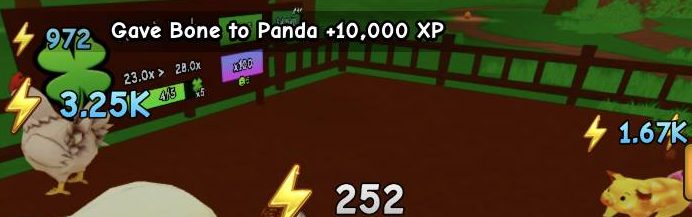
- Look for the banner Gave Bone to Panda +10,000 XP. This means it worked.
- Repeat until your Bones run out.
You can also click a pet in the pen to bring up its Ride Pet / Feed / View options and feed it from there.
Common feeding mistakes
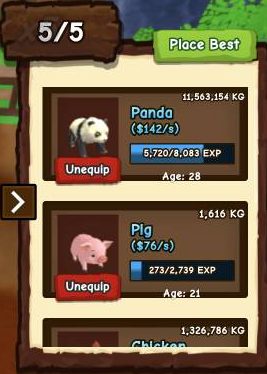
- Feed turns into Unequip. The pet panel can switch a card's button from Feed to Unequip. Read the button and the pet name before every click, or you might take your best pet off the ranch.
- Feed doesn't work on the first click. Sometimes it takes a few clicks before it registers. Don't assume it failed after one try. Check the Bone count in your hotbar to see if it went down.
- Nothing happens at all. Feed does nothing if you have no Bones left. Make sure the Bone is still in your hotbar.
- Still riding. Dismount first. The pet options are harder to reach while you're on your pet.
Who to feed first, and what to do after
Feed your top earner first. Pets don't all earn the same. A Panda can make $142/s, while a Snail makes $3/s. Putting XP into your strongest pet gets you the most cash back.
After your pets level up, open the pet panel and click Place Best. That way your highest $/s pets stay on the ranch.
If you'd like more ways to earn the cash for Bones, have a look at Ride A Pet Tips: How to Make Money Fast. To get stronger pets to feed in the first place, see How to Find and Hatch Eggs in Ride A Pet.
Frequently asked questions
How do you level up pets in Ride A Pet?
Buy food from Tim's Food stand, hold it in your hotbar, then click Feed under a pet in the pet panel. Bone is the food to look for, since it gives +10,000 XP.
How much does a Bone cost in Ride A Pet?
A Bone costs $1,500 in cash. It's an Epic food and gives a pet +10,000 XP when you feed it.
Where is the Food stand in Ride A Pet?
Look for the red-and-white striped Food stand run by an NPC called Tim. Press E to talk to him and click Yup to open the shop.
Why does the food shop say NO STOCK?
Each food has limited stock, and you've bought it all. Wait for the 'New food in Xs' timer (about 5 minutes) or use the green Restock button.
Why won't the Feed button work?
Feed can take several clicks before it registers. It also does nothing if you have no Bones left, so check your hotbar count and make sure the button says Feed, not Unequip.
Which pet should I feed first?
Feed your highest-earning pet first, such as a Panda. Then click Place Best so your best pets stay on the ranch.
hotbar
| Name | Price | Rarity | Details |
|---|---|---|---|
| Bone | $1,500 | Epic | gives a pet +10,000 XP |
Food shop
| Name | Price | Rarity |
|---|---|---|
| Grass | $10 | Rare |