Phone Store Tycoon 📱 is a Roblox tycoon game by Mega Tycoons Studios. The story is simple. Your dad thinks your phones are trash, so you build a huge business to prove him wrong. This guide covers what to do when you first join, how to follow the tutorial, how to earn Cash faster and which mistakes to avoid. Early on there isn't much to learn, so this guide sticks to the first few steps.
What is Phone Store Tycoon?
Phone Store Tycoon 📱 is a tycoon game in the Simulation genre. The game calls itself a part 2 of another game by the same studio, called "📱PROVE DAD WRONG BY MAKING PHONES".
A few useful things to know:
- Up to 4 players can be in one server.
- Private servers are not allowed, so you will always play in a public server.
- Your progress is saved automatically, so you can leave and come back later.
Here's one thing that might surprise you. When you join, the tutorial message says "Welcome to Sushi Tycoon! Start building your sushi restaurant." On the left of the screen you'll also see a Sushi counter next to your Cash. So don't worry if your first steps feel more like running a sushi restaurant than a phone shop. Just follow the tutorial.
How the core loop works
Like most tycoons, the game is about building your business step by step.
- You follow the tutorial to your first buy pad.
- You build up your business so it makes money.
- You spend that money on more pads to grow even bigger.
You have two counters on the left of the screen:
- Cash is the top counter. It starts at 0.
- Sushi is the second counter. It also starts at 0.
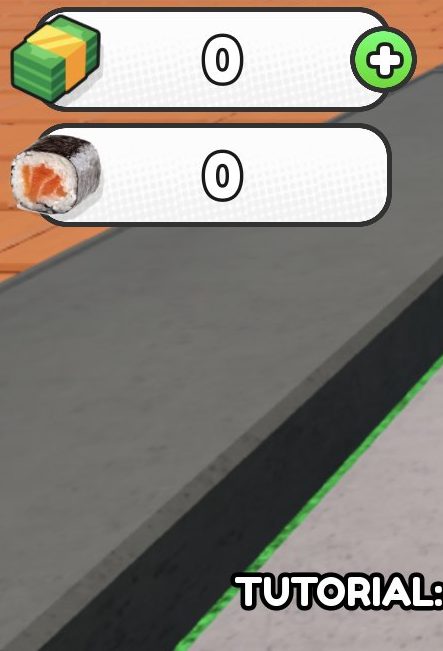
Cash is the main currency you'll use to grow your tycoon.
Your first session, step by step
The tutorial starts as soon as you spawn. It uses white arrows on the ground to show you where to go next.
- When you spawn, look down and find the white arrows on the ground.
- Walk forward along the arrows. When the arrows bend, turn with them.
- Take short steps and check the screen often. Some of the arrows are quite faint.
- If you lose the trail, stop and turn your camera all the way round. Face the way where you can see the most arrows.
- The trail heads towards the torii path (the path with the Japanese-style gates). If you're stuck, head that way.
- Keep going until you reach the end of the trail and your first buy pad.
You'll also earn badges along the way. Started is given just for joining, and there is a PassedTutorial badge too. The game also has Proved and Owner badges to aim for later.
How to earn Cash faster
The best free boost comes from the game's own description:
- Join the Mega Tycoons Studios group on Roblox. The game says this gives you a 50% cash boost.
- After joining, use the code JOINED in the game.
Apart from that, the best plan is to finish the tutorial quickly so your tycoon starts making money sooner.
There is also a x2 Cash game pass for 199 Robux. It's completely optional. You can play and grow your tycoon without it.
What to buy first
Your first buy is whatever pad the tutorial arrows lead you to. Follow the tutorial in order, because each step points you to the next one.
The game also sells game passes for Robux. You don't need any of them. A few examples:
- Sprinting – 14 Robux
- Fast Restockers – 89 Robux
- Fast Workers – 199 Robux
- Auto Serve – 399 Robux
There are also lots of "Hire" passes, like Hire MrBeast and Hire IShowSpeed. The full list is in the tables below this guide.
Controls
Early on, the game is mostly walking and looking around:
- Move with the normal Roblox movement controls (WASD on a computer, or the joystick on mobile).
- Turn your camera to look around and find the white arrows.
- Walk onto buy pads to use them.
There's no sprint key unless you own the Sprinting pass.
Common beginner mistakes
- Looking for the wrong colour. The tutorial arrows are white, not green. If you're looking for green arrows, you won't find the trail.
- Running too far in one go. Some arrows are faint and easy to miss. Use short moves and check the screen often.
- Not turning first. Before you walk, turn to face the trail. Then move forward in small steps.
- Giving up when the trail seems to end. Turn the camera all the way round. The trail usually carries on towards the torii path.
- Forgetting the group boost. Join the group and use code JOINED to get the 50% cash boost.
Frequently asked questions
What is the code for Phone Store Tycoon?
The game description gives the code JOINED. You need to join the Mega Tycoons Studios group first, then use the code.
How do I get the 50% cash boost?
Join the Mega Tycoons Studios group on Roblox. The game says this gives you a 50% cash boost.
Why does Phone Store Tycoon say Sushi Tycoon?
When you join, the tutorial says "Welcome to Sushi Tycoon!" and there's a Sushi counter on the screen. Just follow the tutorial arrows as normal to get started.
Where do the tutorial arrows go?
The white arrows on the ground lead you to your next step. They head towards the torii path, so go that way if you lose them.
Does Phone Store Tycoon save my progress?
Yes, progress is saved automatically.
Can I play Phone Store Tycoon in a private server?
No, private servers aren't allowed. Each public server can hold up to 4 players.